
Sales that start on the minute.
Scheduled sale campaigns for WooCommerce. The sale price is written into each product at the time you set, in your store’s time zone, and every price goes back exactly when the sale ends.
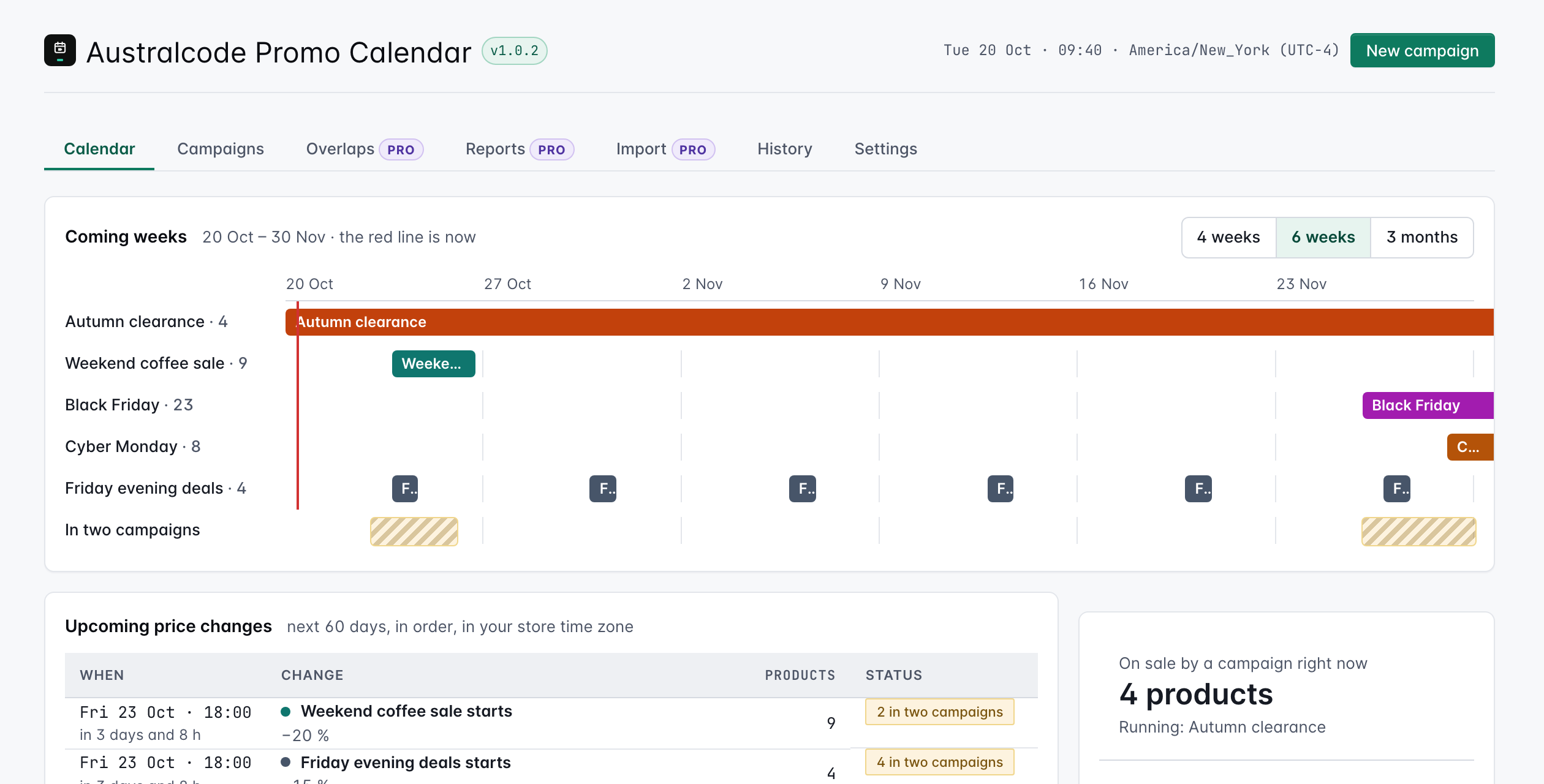
Fri 23 Oct ·
Ethiopia Guji, 250 g
Upcoming price changes
America/New_York · UTC−4

Schedule it on Tuesday. Go home on Friday.
Pick the dates, the products and the discount, check the preview and schedule it. Nobody has to stay up to change prices: they change on their own, at the minute you set.
A real store moved about 600 products in campaign over from its old sale plugin, which compared UTC dates with local time and started every sale three hours late.
- to hand over every running campaign
- 7s
- from start time to the sale price written
- ≤6s
- from end time to the old price shown again
- ≤4s
One real store, October 2026, on managed hosting with the system cron. The store isn’t named.
Everything a sale needs to end well.
When · times are your store time: America/New_York
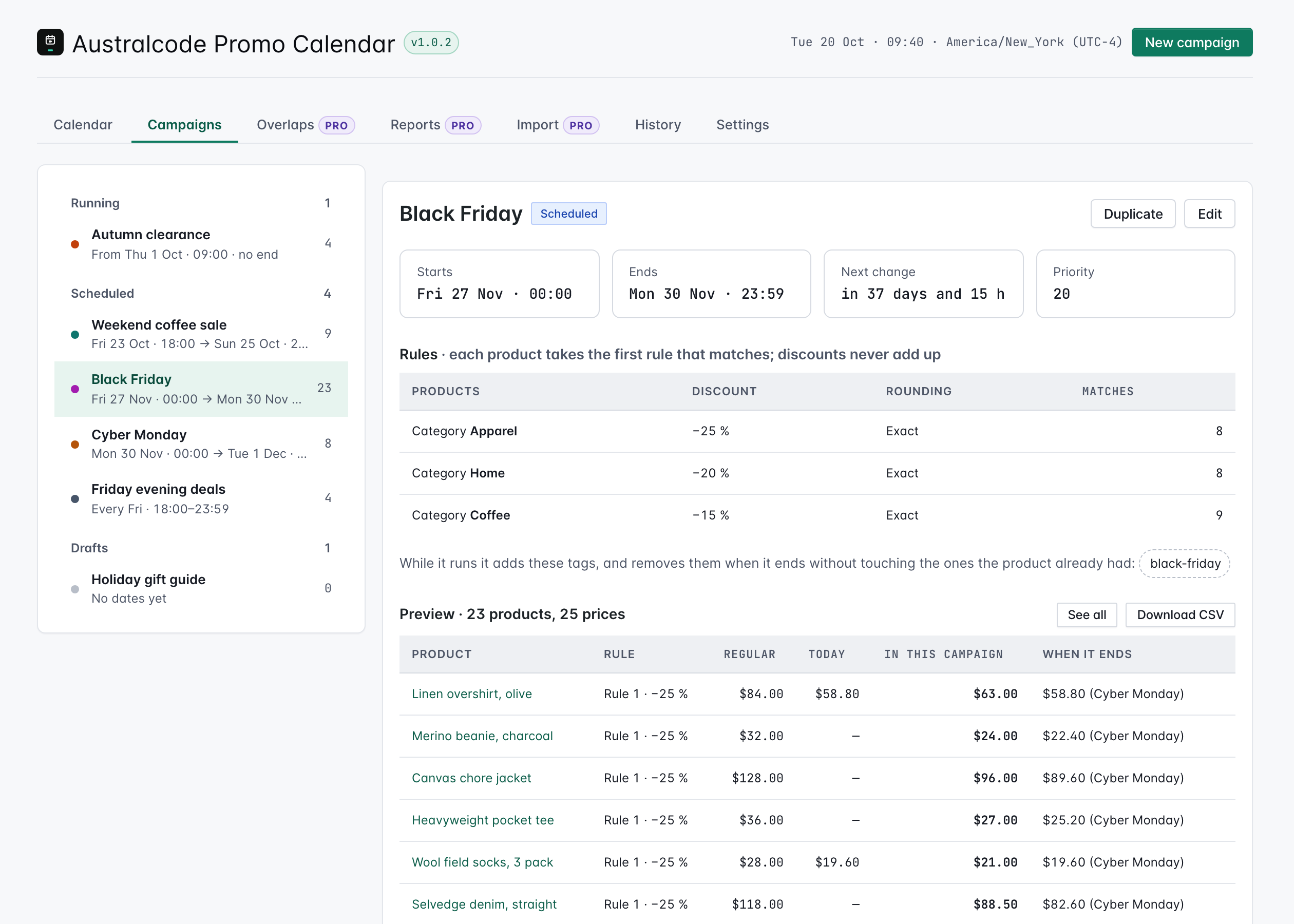
Fri 27 Nov · 00:00 · 2026-11-27 05:00 UTC → Mon 30 Nov · 23:59 · 2026-12-01 04:59 UTC
That time happens twice because of the daylight saving change; the first one will be used.
Black Friday · preview · demo
History · demo
Linen overshirt · in two campaigns · demo
Every price, before anything changes.
Each campaign shows its rules, the tags it adds, and every product with its regular price, today’s price, its price during the campaign and the one it goes back to. Download it as CSV. Nothing changes in the store until the start time.
One price, everywhere it shows.
Discount-rule plugins compute the price on every page view. This one writes the sale price into the product, so everything that reads your catalogue sees the same number as the shop.
- Product feeds, the price filter and “on sale” filters
- Page caches and CDNs, without a price filter on every request
- Your newsletters, with FluentCRM price smartcodes in Pro

Shop $17.60
Product feed $17.60
Price filter $17.60
Newsletter $17.60
Pro runs the season for you.
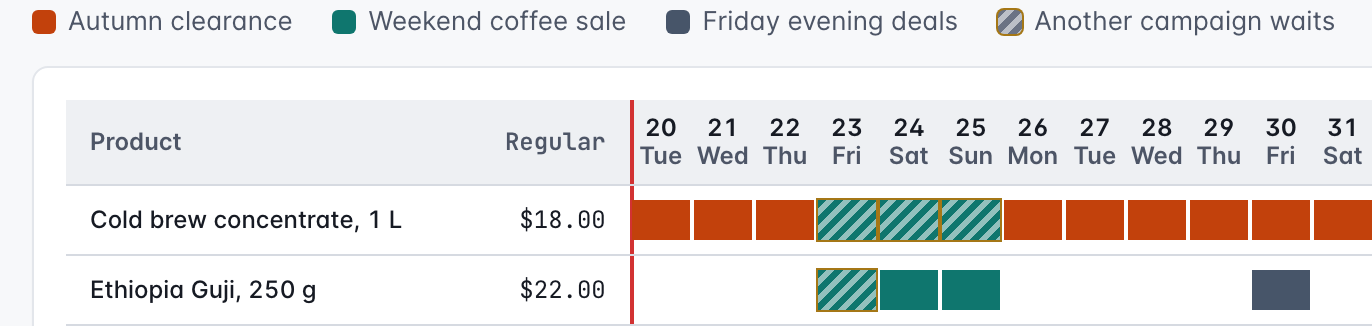
Overlaps, day by day
Which campaign sets each product’s price on each day, and warnings in the calendar before two campaigns clash.
Repeating campaigns
Every Friday evening, or the 1st to the 3rd of every month, set once.
Countdown and badge
Shortcodes for any theme or builder: [acpc_countdown] and [acpc_badge].
“Weekend picks” is scheduled for Sat 10:00 and shows $22.00 for Ethiopia Guji. The store will have $17.60.
Emails that match the shop
FluentCRM smartcodes that print the campaign price, and a warning when a scheduled email will show a price the store won’t have. Plus heads-up emails to your team before every start and end.
Rounding, reports, importers and WP-CLI
Commercial price endings, sales reports per campaign, importers for WooCommerce scheduled sales and CSV price lists, and commands for your deploys.
Priced by store, not by sale.
Free
$0 forever
Unlimited campaigns on the minute, every way to pick products, overlaps, the calendar, the full preview, exact restore and the history.
Free — coming to WordPress.orgPro
$49 a yearor $147 once, for life · one site
Everything in Free, plus repeating campaigns, the overlaps view, commercial rounding, countdown and badge, reports, FluentCRM, importers, team emails, WP-CLI and email support.
Get Pro5 sites: $129/yr or $387 for life · Unlimited sites: $229/yr or $599 for life · Sold by Freemius as merchant of record · 14-day money-back guarantee
Questions store owners ask.
Does it change my prices on every page load?
No. It writes the sale price into the product once, at the start time, in small batches with Action Scheduler. While a batch runs, the right price already shows in the cart; outside those batches the plugin adds nothing to your pages.
Will my product feeds, price filter and newsletters show the sale price?
Yes, because the sale price is stored in the product itself, not computed by a filter at render time. Feeds, the price filter, “on sale” filters, caches and email tools read the same number the shop shows.
What happens to the prices when a campaign ends?
Each product goes back to the price it had before any campaign, from a snapshot taken when the sale started, even if two campaigns overlapped. If someone changed the regular price in the meantime, the plugin recalculates instead of restoring a stale sale price. The history lists every price it changed.
What if I deactivate or uninstall it during a campaign?
Deactivating leaves prices as they are and nothing changes until you activate it again; then it catches up. Uninstalling puts every price back first and then removes the plugin’s data.
My products already have scheduled sales in WooCommerce.
By default a campaign skips them, because WooCommerce ends those sales on its own daily schedule without restoring the previous price. Pro can turn those scheduled sales into campaigns.
Does it need WordPress cron?
Yes, cron has to run. On managed hosting with DISABLE_WP_CRON, set up the system cron; the plugin shows a warning when the scheduler falls behind.
What does Free include, and what does Pro add?
Free is the whole job: unlimited campaigns on the minute, percentage or fixed discounts, every way to pick products, overlaps, the calendar, the full preview, exact restore and the history. Pro adds repeating campaigns, the overlaps view, commercial rounding, countdown and badge shortcodes, reports, FluentCRM smartcodes and parity warnings, importers, team emails and WP-CLI.
How do licensing and refunds work?
Pro is $49 a year or $147 once for one site, with 5-site and unlimited licences too, sold by Freemius as merchant of record with a 14-day money-back guarantee. Without an active licence the Pro screens show a notice, a saved repeating campaign stops applying prices, and commercial rounding falls back to exact; everything in Free keeps working.
What does it need?
WordPress 6.5+, PHP 8.1+ and WooCommerce 8.0+ (tested up to 11.2). HPOS compatible; works with block, classic and page-builder themes. Spanish (Chile and Spain) included.